
Factory devices often ship with fixed IPs such as 192.168.0.x or 192.168.1.x, while a laptop arrives with an address from the office network. So «the cable is in but ping fails» is common, and usually the two are simply not on the same subnet. This guide shows how a subnet mask decides that, and the usual mistakes.
What the subnet mask does
An IPv4 address has 32 bits. The 1 bits of the mask mark the «network» part and the 0 bits the «host» part; AND the address with the mask bit by bit and you get the network address.
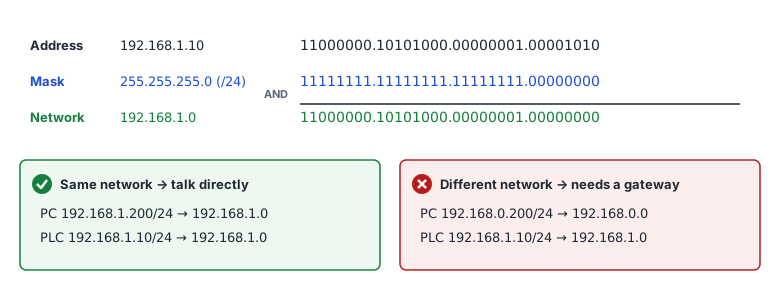
A host ANDs the destination with its own mask. If the result equals its own network address it sends directly on Ethernet (asking for the MAC address with ARP); otherwise it sends to its default gateway (router). Even on the same switch, a different network address means the packet goes to the gateway — and with no gateway it goes nowhere.
Notation: 255.255.255.0 = /24
| CIDR | Subnet mask | Usable addresses | Range for 192.168.1.10 |
|---|---|---|---|
| /16 | 255.255.0.0 | 65,534 | 192.168.0.1 – 192.168.255.254 |
| /23 | 255.255.254.0 | 510 | 192.168.0.1 – 192.168.1.254 |
| /24 | 255.255.255.0 | 254 | 192.168.1.1 – 192.168.1.254 |
| /25 | 255.255.255.128 | 126 | 192.168.1.1 – 192.168.1.126 |
| /30 | 255.255.255.252 | 2 | 192.168.1.9 – 192.168.1.10 |
/n means n leading one bits in the mask (CIDR, RFC 4632). The usable count is 2^(32 − n) − 2: the first (network) and last (broadcast) addresses cannot be given to a device (/31 and /32 are exceptions).
Common mistakes
- Third octet differs: PLC 192.168.0.10/24 and PC 192.168.1.20/24 are on networks 192.168.0.0 and 192.168.1.0 — no direct path.
- Different masks: with PC 192.168.0.5/16 and device 192.168.1.10/24 the PC treats the device as local and sends directly, but the device treats the PC as remote and sends replies to its gateway. Requests arrive, replies never do. Make the masks match.
- Network or broadcast address on a device: in a /24, .0 and .255 are unusable. Smaller blocks such as /25 have boundaries in the middle too (.127, .128).
- Two devices with the same address: several identical units plugged in with their factory IP collide. Connect them one at a time and change each address.
- Gateway outside the subnet: a gateway must be on the same subnet. Traffic inside the subnet never uses it, so the problem only shows when reaching other networks (office LAN, remote access).
- 169.254.x.x: a link-local address (RFC 3927) the PC gave itself because no DHCP server answered — typical when the adapter wired to the device is set to «obtain an IP address automatically».
Joining the device's subnet without dropping your network
Windows lets one adapter hold several IPv4 addresses. Add a free address on the device's network and you reach it while keeping the office connection (e.g. device 192.168.1.10 → add 192.168.1.200, mask 255.255.255.0 to the PC). Administrator rights are required.
- Control Panel → Network Connections → adapter Properties → Internet Protocol Version 4 (TCP/IPv4) → Properties → Advanced → IP addresses «Add» (on an adapter set to a static IP).
- Or Settings → Network & internet → Ethernet → IP assignment «Edit» → Manual → an IPv4 address on the device's subnet.
- From an administrator command prompt: netsh interface ipv4 add address "Ethernet" 192.168.1.200 255.255.255.0 — the quoted part is the adapter name (see ipconfig).
Make sure no other device already uses that address, and remove the extra address when you are done.
When you don't know the device's IP
Check the factory default IP in the device manual first. Otherwise add a PC address on the suspected subnet and sweep it. On the same subnet ARP finds devices even when they block ping. ARP does not cross subnets, so if the subnet is unknown, try common defaults (192.168.0.x, 192.168.1.x, …) one by one.
In PortDock
- «IP Subnet Calculator» web tool: network, broadcast and range from an address and mask; enter the PC and the device to check each direction with its own mask (finds one-way setups).
- Net Scan sweeps the adapter's subnet with ARP and ping, shows the vendor from the MAC address and checks whether industrial ports such as Modbus TCP (502) are open.
- TCP and Modbus Master: once on the device's subnet, connect to IP:502 and check for a real reply.
Published 2026-10-23